Instant Text V Pro — Importer and Workshop
Central to Instant Text is the idea of using several glossaries - not just one. The Importer and the new Glossary Workshop have been designed to help in the creation, modification, and maintenance of these multiple glossaries.
The New Importer
Several additional import formats are included in the revised Importer. Combined with the existing imports, this covers the most important expanders.
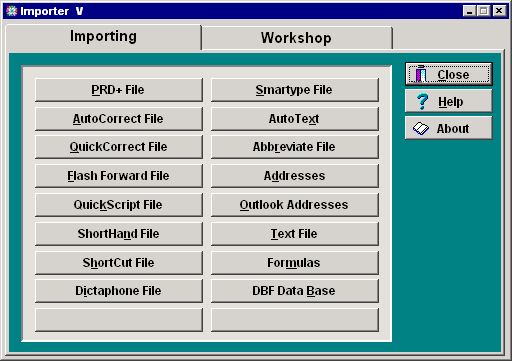
DBF is a widely available format for data bases and handling DBF it makes it possible to import from several proprietary systems. In addition, importing address files is now more powerful, as discussed below.
CSV and DBF Addresses
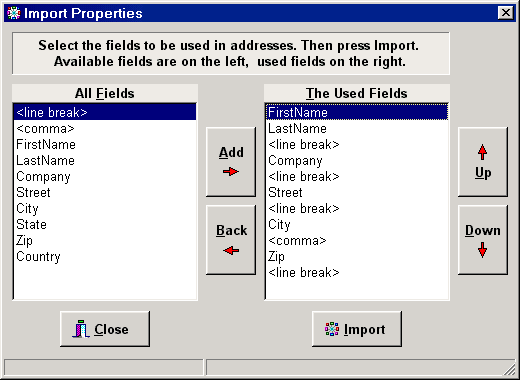
CSV – comma separated values – is a widely used format for databases. It is used for Lotus Organizer address files and several other programs allow exporting an address book to a CSV format. The CSV importing capability of the Importer now offers more flexibility:
Better Address Glossaries
The earlier Importer 3.5 creates short forms for addresses that are made from the initials of the first name-last name combination. Users of large address files want the ability to use other forms and this is what the new dialog shown below now allows:

Selecting Last name produces smith, selecting First and Last produces marcsmith. Selecting Initials produces mfs as in the earlier Importer.
The Glossary Workshop
The revised Importer has a tabbed dialog with the Import functions on one page and various techniques for working on glossaries on a Glossary WorkShop page. These include the current Condense function as well as new techniques to transform a glossary.
Using the Glossary Workshop it is possible to transform a glossary in several ways that are described below. After each step it is possible to view what has been done and to undo to any prior step.

The above example illustrates what can be done in the workshop. It starts with Medbase.glo, removes digits in short forms, then it removes words of less than 7 characters, converts words to lowercase, converts words to phrase entries using the first two and the last letter, converts short forms for two word-phrases by taking the first two letters of each word, and finally condenses the resulting glossary. After each step it is possible to view the glossary obtained.
Glossary cleanup and pruning
The Transform panel provides various methods for cleaning up and pruning a glossary:
- Condense: the current Condense function is one of these methods
- Repair: to repair a glossary that does not open correctly in Instant Text.
- Eliminate word entries that are shorter n characters
- Lowercase word entries using a percentage of occurrences similar to the one used in compilation
- Remove digits from short forms of phrase entries
- Remove frequencies from glossary entries.
Convert Two-Word Phrase Entries
Glossaries created by compilation often contain a number of two-word entries that have the same two-letter short form. Various systems are often used to provide distinct short form and these systems can be formulated using the dialog shown below:
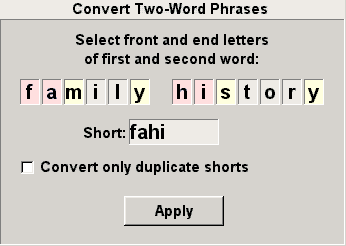
In this example, following a popular system, the first two letters fa of the first word, and the first two of the second word hi are selected. This produces the four-letter short form fahi.
It is possible to apply this transformation to all two-letter entries or only to those that have duplicate short forms.
Convert Word Entries to Phrase Entries
The Words panel provides ways to convert Word entries in entries of the Phrase section. The following dialog is used to specify a choice of front and end letters to be used for the short form:

In this example, the first two letters bi and the last two rs are selected and produce the four-letter short form birs.
In addition, it is possible to take advantage of a user-modifiable prefix list in which abbreviations for prefixes are specified as in the following example:
a=ante
an=antero
...
h=hemi
h=hyper
h=hypo
...
When using prefixes, the prefix letter goes at the front of the short code. For a word such as hyperinflation, the short form will start with hin, with the letter h contributed by the prefix hyper, and the two letters in that follow.
Finally, it is possible to use endings from a list to replace one of the end letters. With this option and using the ending j for tion, the two end letters for inflation become aj.
Selecting the two options gives hinaj for hyperinflation.
Other Conversions
Other glossary conversions include:
- Convert phrase entries into word entries.
This is sometimes used by those who want to use the full subset logic of word abbreviations. - Convert to ABCZ.
This function is offered to licensees of Jon Knowles' ABCZ glossaries and it combines in one pass transformations that otherwise require a word conversion followed by a phrase conversion.
Glossary Exports
Some Instant Text users want to use its powerful glossary compilation to produce vocabularies to be used with voice-recognition systems such as Dragon and Via Voice. The Export panel offer various ways of exporting the contents of an Instant Text glossary for such use:
- Export words and phrases
- Export phrases only
- Export words only
- Export as equal formulas
Finally, Differences
Having provided so many ways to create and modify so many glossaries, there always comes a time when you are starting to wonder what they contain. Of course, you can use the Instant Text Viewer to see what each of them contains. But if you want to see what differences, if any, exist between two glossaries, you can now use "Show Glossary Differences" on the Utilities panel.
Textware Solutions