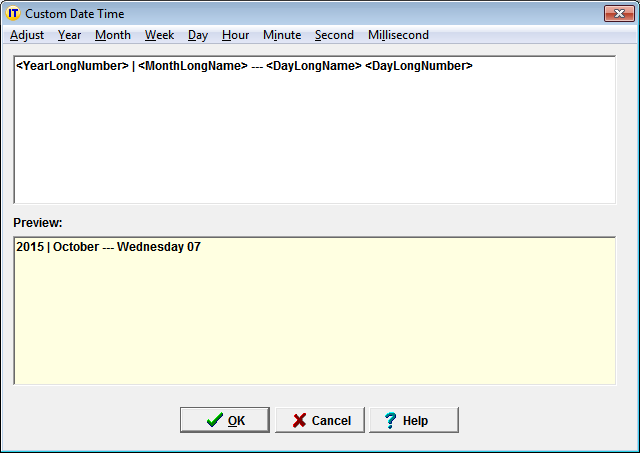
The Custom Date Time Editor can be accessed via the Date and Time menus of the Add Glossary Entry window.
It enables you to build any date or time format by combining the various formats for:
year
month
week
day
hour
minute
second
millisecond
made available in the corresponding menus, as shown in the example below:
By default, the custom date and time macros display the current date and the current time at which the expansion takes place.
If you want to display another date than the current date, or another time than the current time, the Adjust macros of the Adjust menu let you adjust the date and time:
| Adjust macro | Subsequent custom date macros apply to: |
|---|---|
<AdjustYear>-1</AdjustYear> |
date a year ago |
<AdjustMonth>-1</AdjustMonth> |
date a month ago |
<AdjustWeek>-1</AdjustWeek> |
date 2 weeks later |
<AdjustDay>-1</AdjustDay> |
yesterday's date |
<AdjustDay>+1</AdjustDay> |
tomorrow's date |
<AdjustHour>-1</AdjustHour> |
time an hourago |
<AdjustMinute>-30</AdjustMinute> |
time 30 minutes ago |
<AdjustMinute>+30</AdjustMinute> |
time 30 minutes later |
Note that the Adjust macros must be placed before the corresponding year, month, week, day, hour, minute, second, millisecond macros.