Running a Microsoft Word or Excel macro using a Snippet
| Posted by Emmanuel ® , 05/17/2023, 07:43:31 | Reply | Forum |
In this post I will show you a very good Snippet example. It is also a very good example of the use of a variable.
Create a run-macro snippet to run a Microsoft Word or Excel macro
Open the Snippet Glossary in the Glossary Viewer and add the run‑macro snippet:
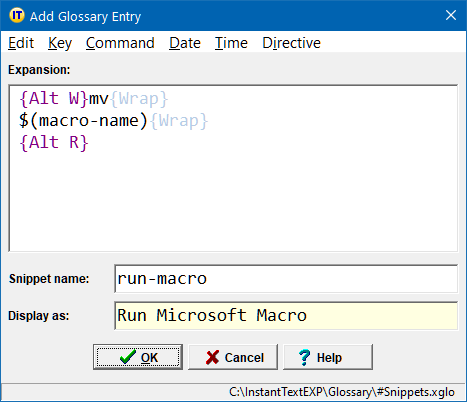
The run‑macro snippet expansion does the following:
-
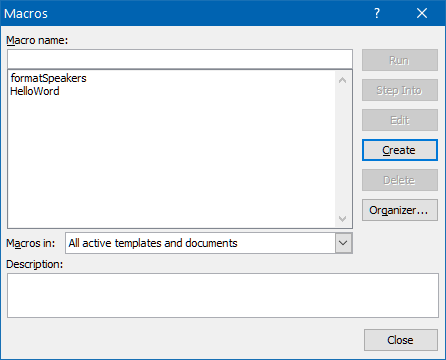
The {Alt W}mv sequence opens the Macros window with the focus on the Macro name editor:
-
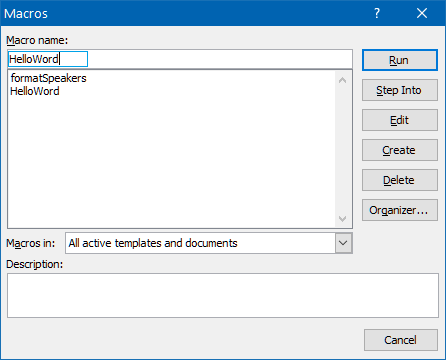
the $(macro-name) variable reference will populate the Macro name editor with the contents of the variable named macro-name:
-
And finally the {Alt R} sequence runs the wanted macro.
Use the run-macro snippet in an expansion to run a macro
Running the HelloWord macro from an expansion is now very simple. All you need to do is:
- use the Set Variable command to set the value of the variable named macro-name to HelloWord.
- and then reference the run‑macro snippet using the Snippet command.
variableName = "macro-name"
variableValue = "HelloWord"
{/SetVariable}{Wrap}
{Snippet}run-macro{/Snippet}
Every time you want to run a Word or Excel macro from within an expansion you can reuse this run-macro snippet. Just set the macro-name variable to the name of the macro you want to run before referencing the run-macro snippet.
| Edit | Reply | | | | Current page | Author |