Instant Text 7 Pro Version 7.30
Installing IT 7.30
To
download the installer please click on the following link:
http://www.textware.com/it7pro/IT7Pro_setup.exe
and then click on Save
or Run,
run
the installer and follow the instructions on the screen.
To be
sure that you have installed the new
version successfully, check the build date by right-clicking the help
button  on the blue Instant Text caption, to open the
About
dialog. It should
now indicate 2015-10-06. Note
that you will not need to
request
a new activation code if you already have one.
on the blue Instant Text caption, to open the
About
dialog. It should
now indicate 2015-10-06. Note
that you will not need to
request
a new activation code if you already have one.

No glossary is modified if you update a previous version. But to be on the safe side, always create backup copies of your glossaries before installing any software.
What is new in Version 7.30
The
following list shows the Instant
Text 7 Pro improvements done in version 7.30:
- Instant
Text is now compatible with the Windows 10 Microsoft Edge browser
- Introducing Custom Date and Time macros
The Date and Time menus of the Add Glossary Entry window now enable you to create any date and time formats via the Custom Date and Custom Time submenus:

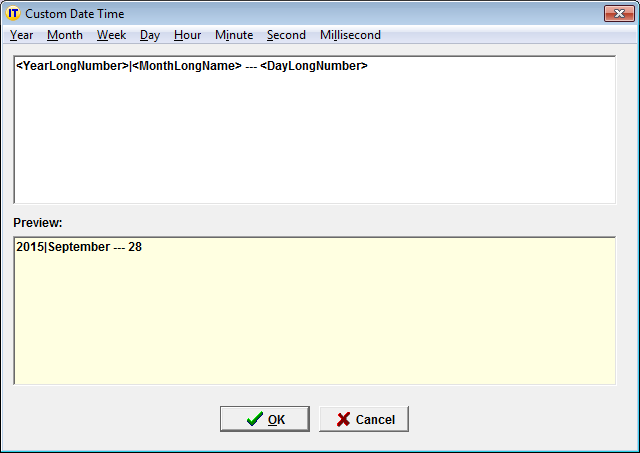
Selecting Custom Date or Custom Time, opens the Custom Date Time editor which enables you to build any date or time format, by combining the various available formats for:
- year
- month
- week
- day
- hour
- minute
- second
- millisecond
as shown in the example below:
Forum - Support
If you have not visited the forum lately, you may want to look at the message titles and see that it is a very good place for exchanging tips, suggestions, and techniques. You may also use the powerful Find feature to find all messages on a given subject.
Of course the forum is no substitute for an active support line! As usual, for specific questions or when you need help, you can email support@textware.com
Textware Solutions
Instant Text Main Forum
Last modified 6 October 2015